Passwords still do a lot of work online, but on their own they are not enough.
People reuse them. Weak ones get guessed. Strong ones get stolen in phishing attacks or pulled from old breaches. Once that happens, one password can open the door to email, website logins, hosting accounts, cloud tools, and more.
That is where two-factor authentication and passkeys come in.
They solve different parts of the problem, and they are not interchangeable in every situation. If you manage a website, work with client accounts, or just want better protection for the accounts that matter most, it is worth understanding the difference.
Why Passwords Alone Are a Problem
A password only proves one thing: that someone entered the right string of characters.
It does not prove:
- who is actually typing it
- whether it was stolen
- whether it was reused from another site
- whether the login page is legitimate
That is why a password by itself is a weak line of defense, even when it is long and unique.
The goal of both 2FA and passkeys is to make account access harder to steal and easier to trust.
What Is 2FA?
Two-factor authentication, usually called 2FA, adds a second step after your password.
Instead of signing in with only:
- username
- password
You sign in with:
- username
- password
- one more verification step
That second step may be:
- a one-time code sent by text message
- a code generated in an authenticator app
- a push prompt on a trusted device
- a physical security key
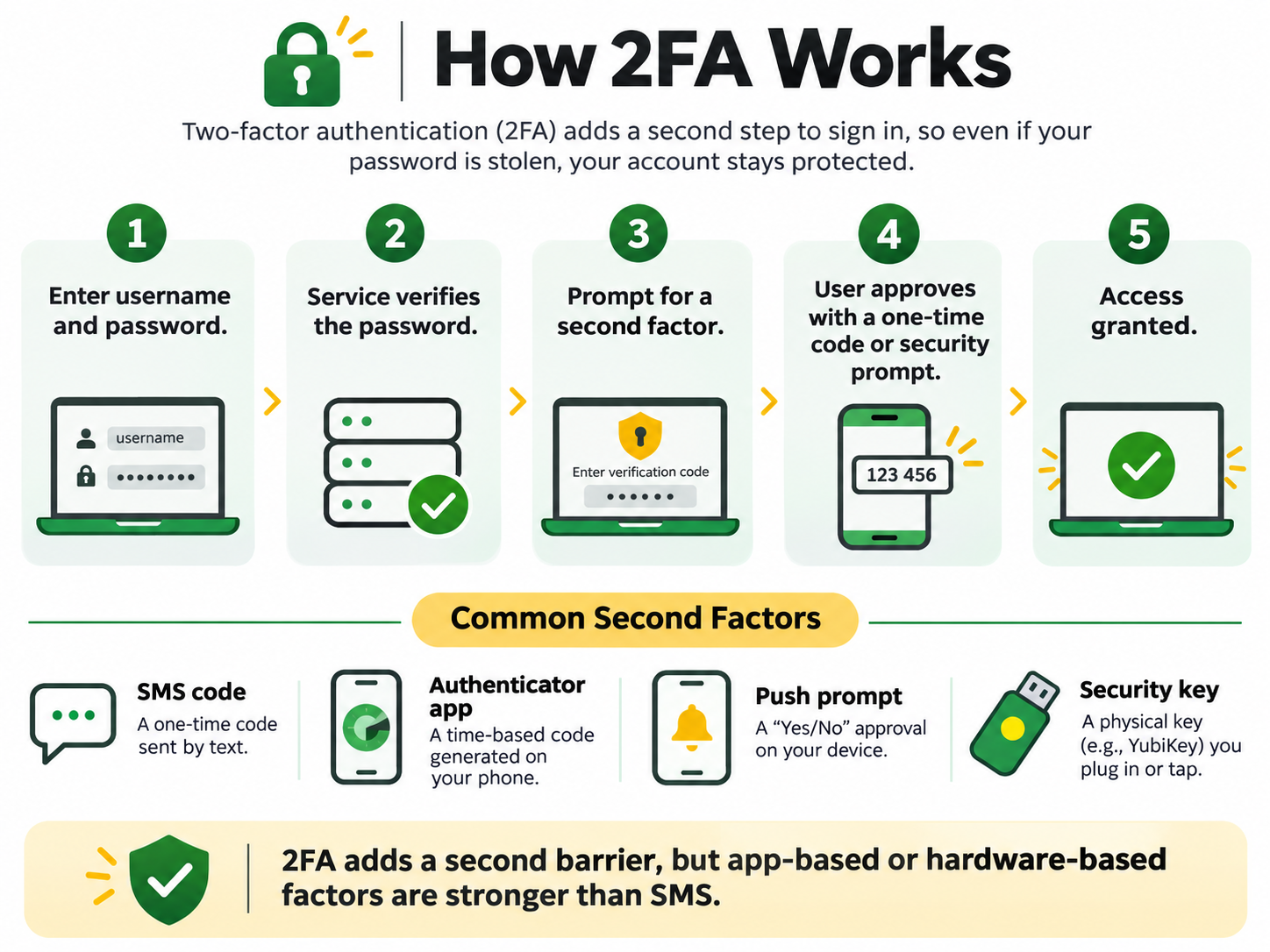
How 2FA adds a second layer of protection after your password
With 2FA turned on, a stolen password alone is usually not enough for someone to get in.
Common Types of 2FA
Not all 2FA methods are equally strong.
1. SMS codes
A one-time code is texted to your phone.
Pros
- easy to understand
- widely supported
- better than password-only logins
Cons
- weaker than other 2FA methods
- vulnerable to SIM swap attacks
- can sometimes be intercepted or socially engineered
2. Authenticator apps
Apps like Google Authenticator, Microsoft Authenticator, Duo, or Authy generate time-based codes on your device.
Pros
- stronger than SMS
- does not depend on text delivery
- easy for most people to use once set up
Cons
- can lock you out if you lose the device and do not have backups
- setup can confuse less technical users
3. Push prompts
A trusted app sends a login approval request to your phone or device.
Pros
- convenient
- usually faster than typing a code
- works well for business accounts
Cons
- can be abused if users approve prompts carelessly
- still depends on the security of the device and app
4. Security keys
A physical key, such as a YubiKey, is tapped or plugged in to approve access.
Pros
- very strong protection
- resistant to phishing
- excellent for high-value accounts
Cons
- costs money
- can be lost if you do not keep a backup key
- not everyone wants to carry one
The Pros of 2FA
2FA is still one of the best security upgrades most people can make right now.
Benefits of 2FA
- protects accounts even if a password is exposed
- widely available across websites and platforms
- relatively easy to roll out
- works well for website logins, email, hosting, and admin tools
- much better than password-only security
For most people and most businesses, turning on 2FA everywhere it is available is still the right baseline move.
The Cons of 2FA
2FA helps, but it does not eliminate every risk.
Drawbacks of 2FA
- many systems still depend on passwords first
- weaker 2FA methods, especially SMS, can still be attacked
- phishing pages can sometimes capture both a password and a one-time code
- account recovery can become messy if backup methods are not stored properly
- the extra step adds friction for some users
This last point matters. Good security that is never set up does not help anyone. The best solution is usually one people will actually use consistently.
What Are Passkeys?
Passkeys are a newer way to sign in without relying on a traditional password.
Instead of creating a password that you type into a website, your device creates a cryptographic key pair:
- a public key stored by the website or service
- a private key stored securely on your device
When you sign in, your device proves you have the private key. You approve the sign-in with something local to your device, such as:
- Face ID
- fingerprint
- device PIN
- another built-in device unlock method
You do not type a reusable password into the site.
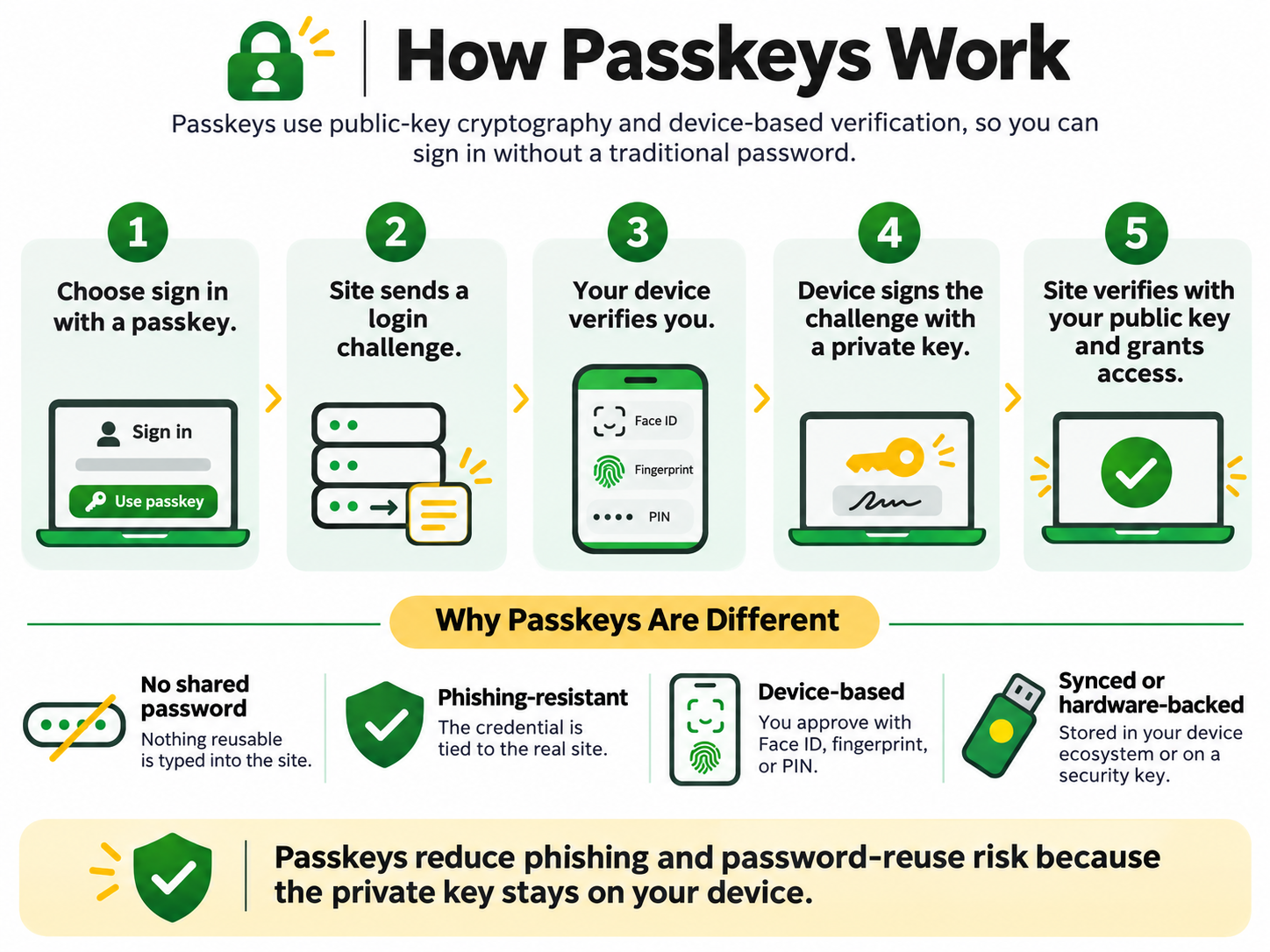
How passkeys work without relying on a traditional password
That is a big reason passkeys are getting attention. They reduce two common problems at the same time:
- password theft
- phishing
How Passkeys Work in Plain English
A passkey login usually looks like this:
- You choose to sign in with a passkey.
- The website sends a login challenge.
- Your device verifies you locally with Face ID, fingerprint, or PIN.
- Your device signs the challenge with its private key.
- The website checks that response with the matching public key and lets you in.
The important part is this: the private key never leaves your device.
That means there is no reusable password being typed into a login form that could be stolen, replayed, or reused somewhere else.
The Pros of Passkeys
Passkeys solve several problems that passwords and standard 2FA do not solve as cleanly.
Benefits of passkeys
- no reusable password to steal
- strong resistance to phishing
- simpler day-to-day sign-in once set up
- tied to real websites and services
- less risk from password reuse
- often faster than password plus 2FA
For supported platforms and important accounts, passkeys are an excellent option.
The Cons of Passkeys
Passkeys are strong, but they are not friction-free.
Drawbacks of passkeys
- not every website or service supports them yet
- users may not understand how they are stored or synced
- moving between devices and ecosystems can be confusing
- recovery planning still matters
- teams may need training and backup methods
For example, passkeys can feel very smooth inside one ecosystem, but more awkward if someone uses a mix of Apple, Windows, Android, multiple browsers, or shared admin workflows.
So while passkeys are powerful, they are not yet a universal replacement for every login system and every business setup.
2FA vs Passkeys
Both improve account security, but they do it differently.
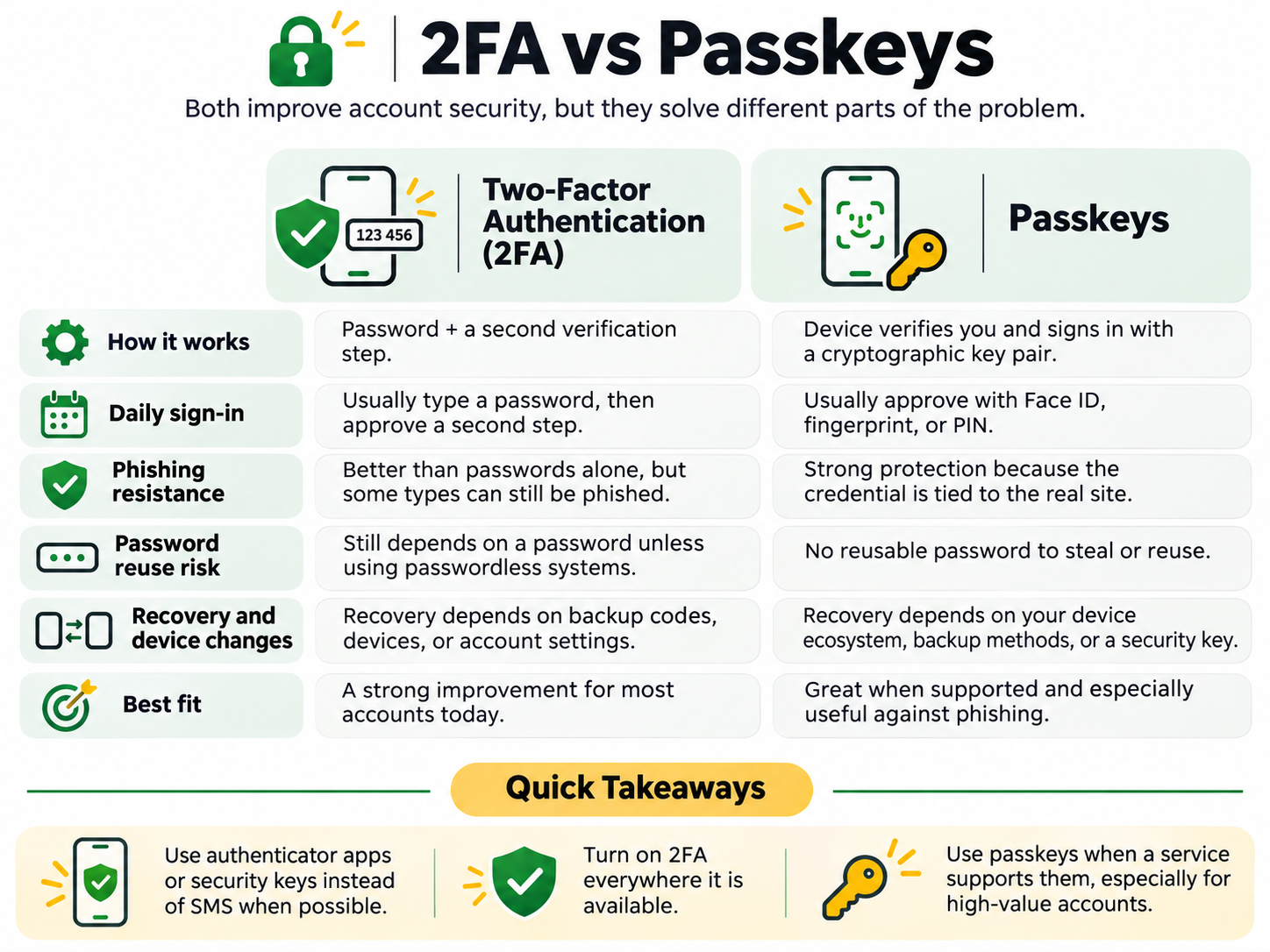
A practical comparison of 2FA and passkeys
In simple terms:
2FA
Adds a second step after a password.
Passkeys
Replace the reusable password model with device-based cryptographic authentication.
Practical comparison
| Topic | 2FA | Passkeys |
|---|---|---|
| Password required | Usually yes | Usually no |
| Phishing resistance | Better than password-only, but varies by method | Much stronger |
| Ease of setup | Usually straightforward | Improving, but still newer |
| Daily convenience | Extra step every login | Often simpler once set up |
| Compatibility | Widely supported | Growing, but not universal |
| Best use today | Baseline protection for almost every important account | Best where supported, especially high-value accounts |
What I Recommend for Website Owners and Businesses
If you manage a website, client accounts, business email, or admin access, here is the practical version.
Use 2FA everywhere it is available
This is still the easiest high-impact improvement for most people.
Priority accounts:
- email accounts
- domain registrar accounts
- hosting accounts
- WordPress admin accounts
- cloud storage
- payment platforms
- CRM and marketing systems
- team collaboration tools
Prefer authenticator apps or security keys over SMS
SMS is better than nothing, but it is not the strongest option.
If you have a choice, use:
- authenticator app
- push authentication
- hardware security key
before relying on SMS.
Use passkeys where they are supported
Especially for:
- Google accounts
- Microsoft accounts
- Apple accounts
- password managers
- other high-value services that support them well
Passkeys are particularly appealing for accounts where phishing risk matters.
Keep backup and recovery methods organized
This part gets ignored too often.
Security is not just about blocking attackers. It is also about making sure you do not lock yourself out.
Keep track of:
- backup codes
- secondary devices
- recovery methods
- backup security keys where appropriate
For teams, document the setup
If multiple people manage a website or business systems, do not leave account security as a mystery.
Document:
- who has access
- which 2FA method is in use
- where recovery methods are stored
- how access is removed when roles change
Common Mistakes to Avoid
1. Using SMS everywhere by default
It is convenient, but it should not always be your first choice.
2. Turning on 2FA but not saving backup codes
This is how avoidable lockouts happen.
3. Thinking passkeys remove the need for account planning
They improve sign-in security, but recovery and device management still matter.
4. Securing WordPress but not email or hosting
Your website is only part of the picture. If your email or hosting is weak, your website is still exposed.
5. Letting one person control everything
For business continuity, do not leave critical access tied to one employee, one contractor, or one device.
A Simple Rollout Plan
If you want a practical place to start, this is it:
- Turn on 2FA for your email account.
- Turn on 2FA for your hosting and domain registrar.
- Secure WordPress admin accounts.
- Move from SMS to an authenticator app where possible.
- Use passkeys for supported high-value accounts.
- Save backup codes securely.
- Review access for anyone on your team.
That is enough to make a meaningful improvement without turning security into a major project.
Final Thoughts
2FA and passkeys are not competing in a way that means you have to choose only one forever.
Right now, the practical answer for most people is:
- Use 2FA everywhere you can
- Use stronger 2FA methods when possible
- Adopt passkeys where supported, especially for important accounts
If you manage website, hosting, email, or business tools, this is one of those areas where a few good decisions can prevent a lot of trouble later.